📚 Agora node [[markup]] ☆
Agora nodes contain community contributions with titles or topics that match your search. x
📜 File markup.myco by @melanocarpa ☆ 📎 ️🔗 ✍️ ⛶

Markup language is a formal language for marking up a document using text.

A popular way to differentiate markups is lightweight vs not lightweights. A classic example of the former is Markdown, which people talk too much about nowadays.

See also /category/markup language and Invalid interwiki: interwiki not set up .

Mycomarkup is my take on how lightweight markups should be designed. I consider it to be better than all other solutions so far.

Soupalt:

I've found a nice little tool that is perfect for post-processing HTML "dumps" (like for example exported from wikis / note taking tools or static site generators):

(I've included the GitHub link because it's quite hard to find it on the main site)

It can be used to insert snippets, mangle paths, create indices, etc.

BTW, I remember having a discussion with Lion and Timur about how HTML can be used for augmentation (in a post-processing step) instead of augmenting each and every markup language with various constructs.

Интересно вот это:

[this is also a link] = create a hyperlink to an internal WikiPage called
             'ThisIsAlsoALink' but show the link as typed with spaces.

Я о таком думал, интересно увидеть это implemented.

A Muse document uses special, contextual markup rules to determine how to format the output result. For example, if a paragraph is indented, Muse assumes it should be quoted. Indentation is heavily used to determine if the paragraph is something different from “normal” text.

Textoole это мощный язык разметки, немного похож на Markdown и Textile, некоторые идеи заимствованы из MarkedText.

Yandex Flavored Markdown (YFM) syntax

Another one.

Anyway, that was then and now is now, and when I look at that code now and my current needs I feel a little unsatisfied with the needless parsing complexity of gemtext. Because even though it's very easy, it's still harder than it could be.

There are two fundamental problems with the existing document markup languages: Either they are not easy to use, or they are not well suited to write complex documents, such as technical articles, user manuals, or books. An example of “not easy to use, but suited for complex documents” would be Docbook. An example of “easy to use, but not suited for complex documents” would be Markdown.

Of course, the above categorization is simplistic. But it should serve as a good starting point to get the gist of this article which aims to delineate the kind of problems that occur in practice. You’ll see many representative examples of markup code that illustrates what’s wrong, complemented by links to more information.

You’ll also discover a new markup language. Lots of examples will demonstrate how a new syntax can lead to a language that is “easy to use and suited for complex documents”. A proof-of-concept implementation is already available.

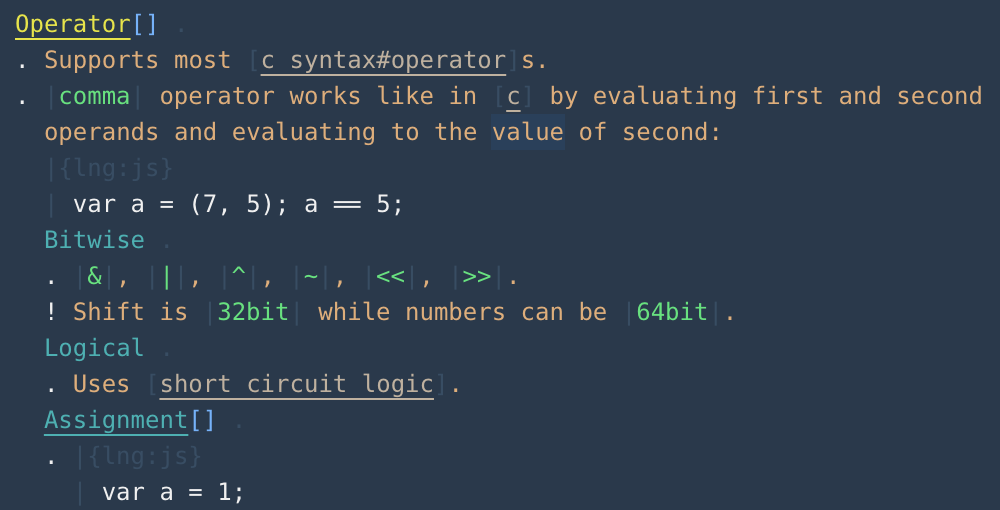
"Xi" is a markdown-like language designed for a personal knowledge base. Color and indentation are used to highlight headings, paragraphs, links, source code examples and definitions. You can read and write Xi from within a VSCode without a need to "render" it into a "visual" web page or PDF. This makes Xi a very fast tool to keep records: you grep someting, skim through Xi pages, add or change some text from within a same editor, without a need to switch between 'edit' and 'previes' modes. An example of Xi page from my personal knowledge base with Memory color theme:

Another Markdown derivative

As a result of the non-standardization of blocks, our end-users suffer. If someone is using my blog engine, they can only use those blocks that I had time to implement. Those blocks may be pretty basic or incomplete. Users might want to use a fancier block that they saw in WordPress or Medium or Notion, but my editor doesn’t have it. Blocks can’t be shared or moved around very easily, and our users are limited to the features and capabilities that we had time to re-implement.

To fix this, we’re going to create a protocol called the Block Protocol.

📜 File Markup.md by @agora@botsin.space ☆ 📎 ⛶
📜 File markup.md by @an_agora@twitter.com ☆ 📎 ⛶

Loading pushes...

✨ AI Synthesis Mistral Gemini ChatGPT Claude x

Expanding this section will automatically generate an AI synthesis of the contributions in this node.

🌌 Agora context for [[markup]]

Rendering context...

📚 Agora node [[mediawiki markup]] (pulled by the Agora)
📜 File mediawiki_markup.myco by @melanocarpa ☆ 📎 ️🔗 ✍️

MediaWiki has its own markup, they call it wiki markup. This is the first lightweight markup I had experience with (if you do not consider PHPBB markup to be lightweight).
Why I don't like it

  • Syntax for bold and italic. ''italic'' and '''bold'''. This is classic! This syntax comes from very first wikis. But it's bad:

    • Easy to confuse '' and " when editing in proportional font. This alone is enough.

    • Six characters in total for one of the most used emphases (bold) is kinda uh.

    • Not available on the standard Russian keyboard layout.

  • Headings have to be closed at the end:

    == heading ==

    And they also haven't resolved the level 1 problem.

  • Indentation-based preformatted text.

  • Inclusion of HTML tags such as <br> and pseudo-HTML tags such as <nowiki>.

  • Support of inline styling. Sure, because of that there are Mediawiki wikis with really good visuals, but you know the problems.

  • Ridiculous linking of namespaces File and Category.

  • Two different syntaces for local links and external links:

    [https://example.org text after space]
    [[article | text after bar]]
  • List items are limited to one paragraph.

  • The syntax for image insertion is the same as linking a text page, except it's different.

  • Tables that are so strong they replace everything not supported by the markup.

  • Magic words like NOTOC and #REDIRECT.

  • Wrong line-break logic.

And for some reason, on mature MediaWiki wikis, almost every page is filled with countless {{}}s.

Why I like it

Still much better than Markdown.

  • Bracketed links.

  • Character-repetition-based list nesting.

  • = for headings.

  • Tables are useful.

  • The colon element is cute.

  • Good macros (called templates).

📚 Agora node [[modeless markup]] (pulled by the Agora)
📜 File modeless-markup.md by @neil ☆ 📎 ️🔗 ✍️

modeless markup§

📚 Agora node [[mycomarkup]] (pulled by the Agora)
📜 File mycomarkup.md by @flancian ☆ 📎 ️🔗 ✍️

mycomarkup§

📜 File mycomarkup.myco by @melanocarpa ☆ 📎 ️🔗 ✍️

Mycomarkup is my take on how markups are to be made. It is the only markup supported in Mycorrhiza.

Historically, it is a descendant of Gemtext, with a big influence of Creole.

Read docs.

📜 File pages/mycomarkup.org by @vera ☆ 📎
* https://mycorrhiza.wiki/help/en/mycomarkup * [[mycomarkup parser]] * supports [[mediawiki-style links]] *
📜 File mycomarkup.md by @anagora@matrix.org ☆ 📎
📜 File Mycomarkup.md by @anagora@matrix.org ☆ 📎
  1. Change the storage medium to something based on [[SQLite]]

  2. Support more formats, including [[Mycomarkup]]

  3. Fetch through more media, not just [[Git]], but also parsing [[microformats]] and whatnot

  1. Change the storage medium to something based on [[SQLite]]

  2. Support more formats, including [[Mycomarkup]]

  3. Fetch subnodes through more media, not just [[Git]], but also parsing [[microformats]] and whatnot

📚 Agora node [[overlapping markup]] (pulled by the Agora)
📜 File overlapping markup.md by @flancian ☆ 📎 ️🔗 ✍️

overlapping markup§